From signup to first reward in under 60 seconds. No app required.
PerQ is a digital stamp card. That's the simplest way to describe it.
Instead of a paper card that gets lost or forgotten, your customer's loyalty card lives inside an app that's already on their smartphone. On iPhones it's called Apple Wallet. On Android smartphones it's called Google Wallet. It's the same app people use to store their boarding passes, concert tickets, and bank cards.
Most people have used the Wallet app without realising it. Apple Wallet and Google Wallet come pre-installed on every iPhone and Android smartphone. Your customers already have it. Nobody needs to download anything new.
Inside the Wallet app, each item is called a pass. A boarding pass is a pass. A concert ticket is a pass. Your PerQ loyalty card is a pass. When a customer scans your QR code, your branded loyalty pass is added to their Wallet app automatically. It sits there alongside everything else they already have.
Below is an example of what your customers will actually see inside their Wallet app. Your logo, your colours, your business name, and their current stamp count, all on one card.
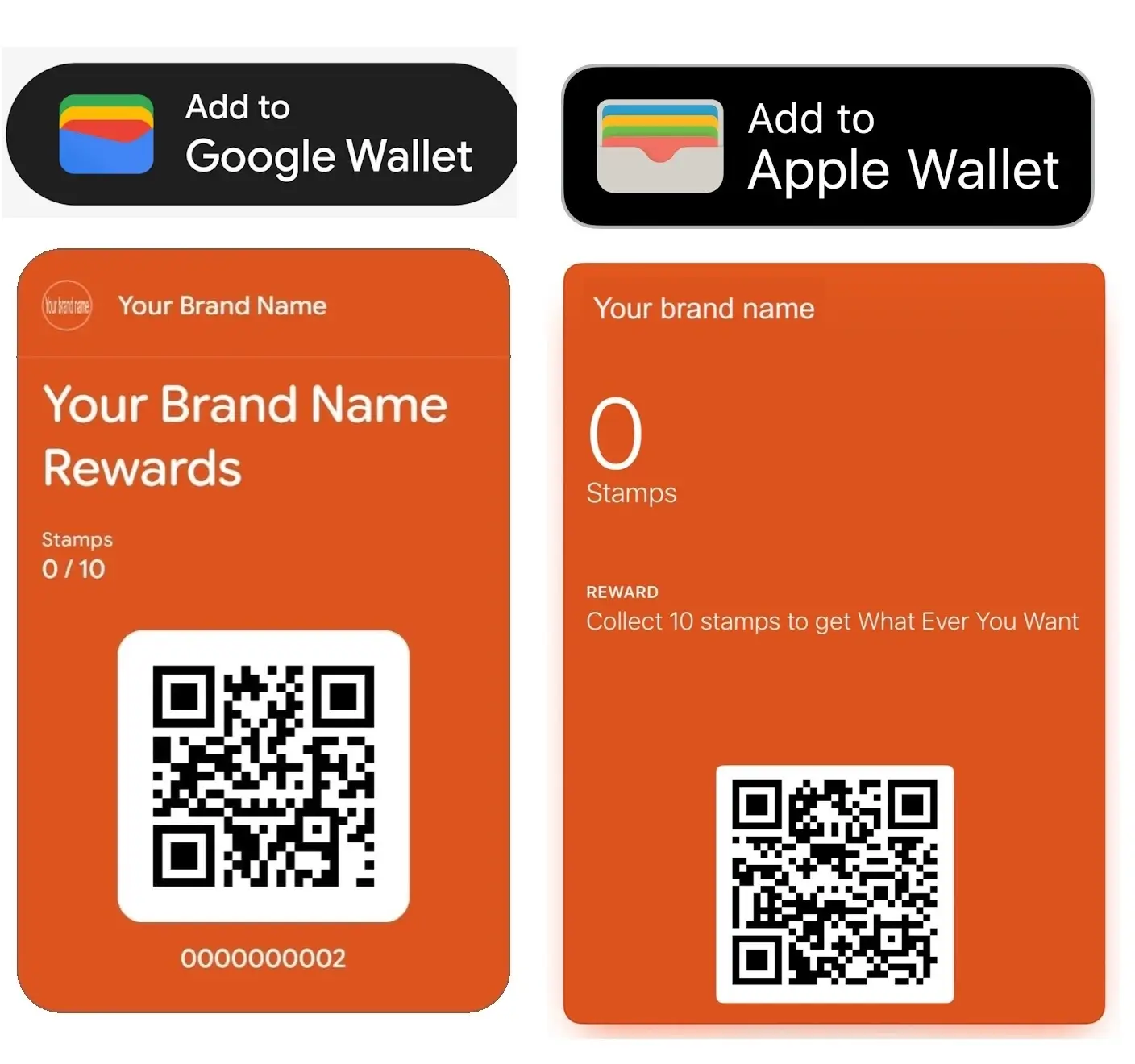
An example of a branded PerQ loyalty pass inside Apple Wallet. Your customers see your logo, your colours, and their stamp count every time they open it.
Once you have set up your PerQ account, you get your own unique QR code. A QR code is simply a square barcode that any smartphone camera can read. You download it, print it off, and display it in your shop. If you'd rather have something more polished, we offer a loyalty poster pack for a small additional fee.
A customer points their smartphone camera at your QR code and taps the link that appears. If you have data capture switched on, they enter their name and mobile number and tick to confirm they're happy to hear from you. Then they tap Add to Wallet and your branded loyalty pass lands straight in their Apple Wallet or Google Wallet. The whole thing takes about thirty seconds. No app to download. No password to remember.
Once their pass is in their Wallet, it can also give them a gentle nudge on their lock screen when they're near your shop. This is a built-in Apple Wallet and Google Wallet feature that switches on automatically once your trading location is set up. There's nothing extra for you or your customer to do.
Next time they come in, they open their Wallet app, find their pass, and show you the QR code on it. That's how you know who they are and how many stamps they have.
Download the free PerQ Scanner App to your smartphone or tablet. Enter your retailer access code, select your name from the staff list, and enter your 4-digit PIN. Staff can each have their own login this way, or you can set up one shared login for a device. It's a one-off setup and takes about thirty seconds.
When a customer wants a stamp, they open their Wallet app and show you their pass. You scan the QR code on their pass with the PerQ Scanner App. The stamp is recorded instantly. Their pass updates on the spot. No manual input. Nothing to type in.
If you take payments through Square, there's a second way. Once your Square integration is connected, scanning a customer's pass with the 2D barcode scanner on your Square terminal adds their stamp and tracks rewards automatically as the payment goes through, so you don't need a separate scan with the PerQ Scanner App afterward. An Epos Now integration works the same way and is currently in final testing.
If you run more than one shop, PerQ supports multiple trading locations under a single account. When staff sign in to the Scanner App, they select which location they're working from, so stamps and rewards are recorded against the correct site.
When a customer hits the required number of stamps, your PerQ Scanner App tells you automatically. A reward alert appears on screen. You hand over the reward, tap confirm on the app, and their pass resets back to zero stamps. Their Wallet pass updates itself.
If you take payments through Square, rewards work a little differently. Instead of confirming in the Scanner App, rewards are detected automatically from your Square till. Epos Now works the same way once its integration is fully live.
You decide what the reward is and how many stamps it takes to earn it. That's entirely up to you.
Click the button below. You'll create your account, upload your logo, pick your brand colours, and set your reward. Your unique QR code is ready in under 60 seconds. Print it off, stick it on your counter, and you're running a loyalty scheme today.
Free for 30 days. No contract. No risk.
Start Your Free 30-Day Trial. Set Up In 60 Seconds.Every customer who joins and leaves their details is added to your database automatically. Over weeks and months that list grows into a real marketing asset. Names and mobile numbers of people who have already bought from you.
To access it, log in to your PerQ Dashboard. On a desktop, click the Log In button in the top right corner. On a smartphone or tablet, tap the three-bar menu and then tap Log In. Select PerQ Dashboard and sign in with your account email and password.
From there you can download your customer data any time you like, update your account details, and make changes to your loyalty scheme.